A recurring events calendar for the things that repeat
This recurring events calendar handles events you would otherwise retype: a weekly stand-up, a term of classes, a monthly bill. Set the repeat once and choose when it ends.
- Runs in the browser
- Ends never, on a date or after N times
- Edit one occurrence or the series
- Works with
- .ics
- iCalendar
- TZID
Use cases
Weekly stand-up
Every week on chosen weekdays, with an end date when the project closes.
Term-time classes
Every week during term, then a fresh series for the next term, leaving holidays empty.
Birthdays and renewals
Every year on the same date; a monthly bill on day N, with a reminder before it is due.
Can I use this recurring events calendar on a website?
No. This is a personal calendar, not a publishing tool: no embed code, no public page and no feed for a site builder. If the dates must appear on a website, use Save as… and hand the .ics file to whoever manages the site.
Can I move a recurring series from a shared work calendar?
Yes, through the file. Export the series as an .ics from the work calendar, then open the .ics here or import it. The repeat rule and its exceptions come across. A live connection does not: the series will not update when the shared calendar changes.
How are recurring calendar events stored?
Each series is one event with a repeat rule, not a pile of copies. In the .ics file that rule is an RRULE line, with EXDATE for skipped dates and RECURRENCE-ID for an edited occurrence. The subset covers daily, weekly, monthly and yearly rules.
How do recurring events behave on a phone?
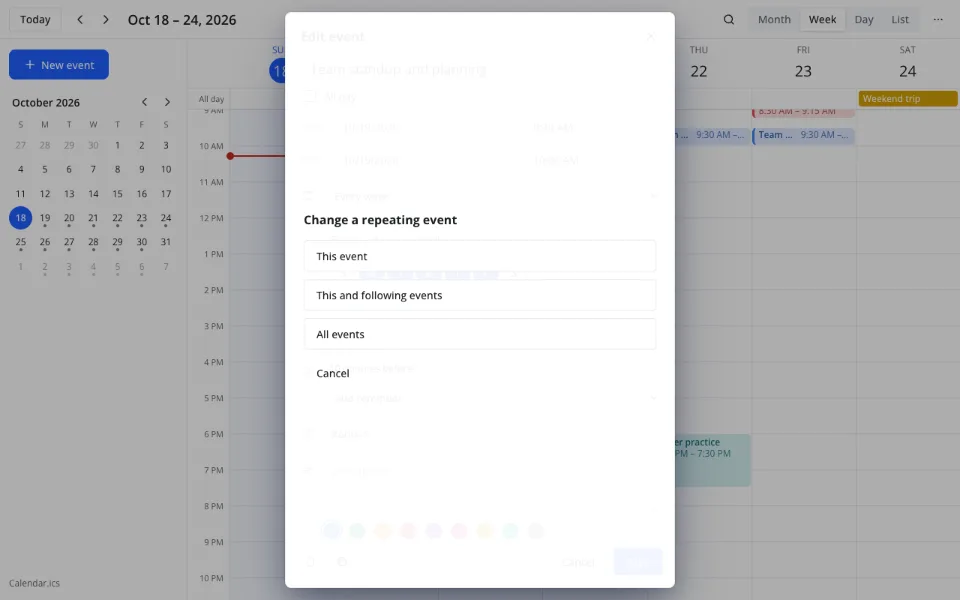
The same as on a computer: every occurrence appears on its day, and editing one offers This event, This and following events or All events. On a touch screen a finger scrolls the grid, so moving an occurrence is done through the form. The series saves itself.
How to make an event repeat
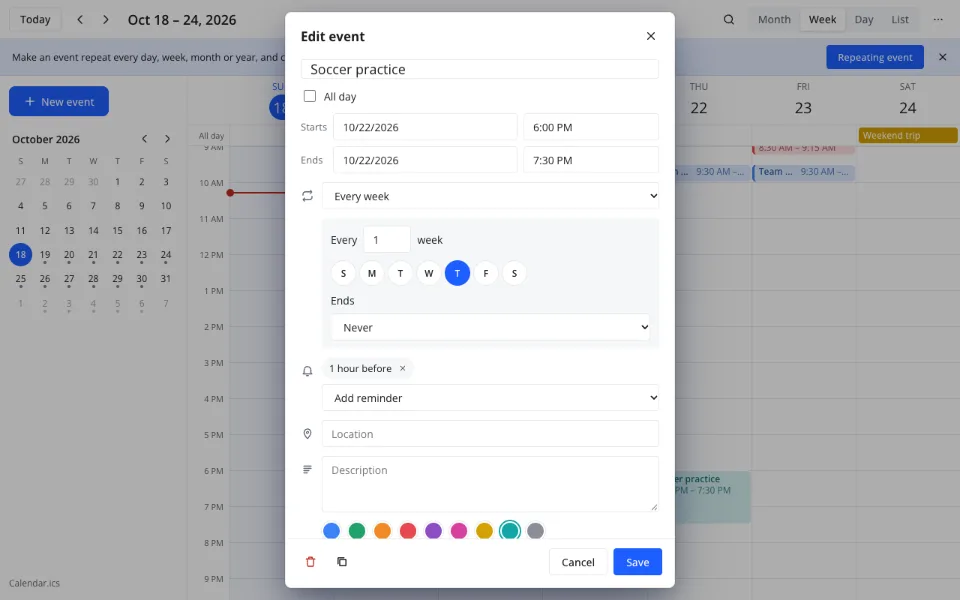
Open Repeat in the event form
Create or edit an event and find the Repeat list under the time fields. It starts at Does not repeat.
Choose the pattern
Every day, every week on chosen weekdays, every month on day N or a weekday, or every year; then set the interval.
Decide how it ends
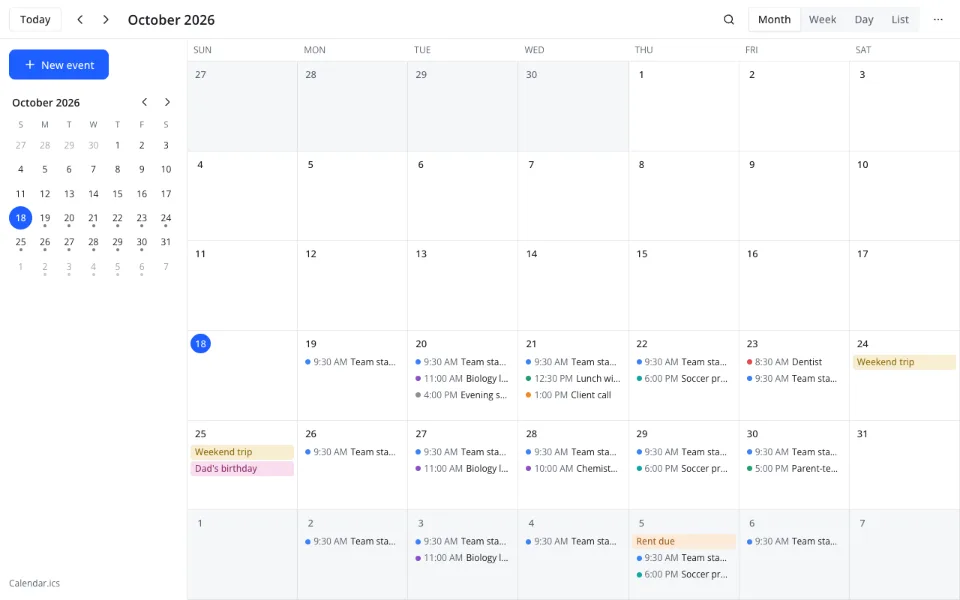
Never, On date or After N times. The series appears on every matching day, and each occurrence can be edited alone.
How do I change just one occurrence?
Open the occurrence and edit it; the app asks whether you mean This event, This and following events or All events. Choosing This event leaves the rest untouched and records an exception. Deleting works the same way.
Features
| Feature | What it gives you |
|---|---|
| Patterns | Daily, weekly, monthly on day N or a weekday, yearly |
| Interval | Every N days, weeks, months or years |
| Weekdays | Choose the days for a weekly repeat |
| End | Never, On date, After N times |
| Editing | This event, This and following events, All events |
| File | RRULE, EXDATE and RECURRENCE-ID in the .ics file |
What repeats do not cover
- Rules beyond the supported subset are kept in the file but may show once
- No public holiday or term-date calendars to import
- No sharing a series with other people
- No reminders when the calendar window is closed
Privacy
The calendar is an .ics file in your cloud, with no third-party calendar servers, and stored data is handled under GDPR. Here it runs in your browser.
FAQ
Support: [email protected]
How to repeat calendar events?
Open the event and find Repeat in the form. Choose Every day, Every week with the weekdays you need, Every month on a day number or weekday, or Every year. Add an interval if needed, then pick Never, On date or After N times.
How to repeat calendar events on a phone?
Use the phone's browser and open the event form; Repeat works as on a computer. Pick the pattern and the end, then save. A finger scrolls the grid, so occurrences change in the form, and the series saves itself straight away.
How to delete recurring events on calendar?
Open any occurrence and delete it. Choose This event, This and following events or All events. All events removes the whole series; This event removes only that day. The choice is recorded in the .ics file, so it survives reopening.
How do I remove one occurrence from a series?
Open that occurrence and delete it, then choose This event. The rest of the series stays. To remove the following ones too, choose This and following events. The skipped date is stored as an exception, so reopening the calendar does not bring it back.
What happens to a monthly repeat on the 31st?
It skips months that have no 31st. A yearly repeat on 29 February does the same in a common year: the occurrence does not appear, and the series continues at the next matching date. Nothing shifts to the 30th or 28th.
Is it free? Is there a watermark?
Repeating events are free and cost $0, like the rest of the calendar. There is no watermark, no limit on the number of series and no paid tier. The rules live in your own .ics file that you can take elsewhere.
Is it safe to keep repeating events here?
On this page the calendar runs in your browser. In Zotu it is stored as an .ics file in your cloud, with no third-party calendar servers, handled under GDPR. Repeat rules and details stay in that file rather than another service.
More tools
A recurring events calendar for the things that repeat
Daily, weekly, monthly and yearly series with exceptions.
Open the calendar