A calendar app that sends reminders before the day runs away
This calendar app that sends reminders works in a browser tab and needs no installer. Set a nudge for a client call, a shift handover or a bill due date, then get on with the day.
- Runs in the browser
- At start, minutes, hours or a day before
- A switch for notifications in Settings
- Works with
- .ics
- iCalendar
- TZID
Use cases
Client meetings
A nudge ten minutes before gives you time to open the brief, check the link and stop the previous task cleanly.
Work shifts
One reminder the evening before an early start, another at the handover, and the rota stops being a memory test.
Family and practice runs
Pickup at six and practice at half past get separate reminders, both sitting in the same calendar.
Bills and renewals
Put the due date on a timed event if you want the nudge: all-day events do not take reminders.
What should a calendar with reminders do?
A calendar with reminders should let you set the nudge where the event is, not in a second app. Here the bell icon in the event form offers At start, 5, 10, 15 or 30 minutes before, 1 hour before and 1 day before, with up to five on one event. A new timed event starts with 10 minutes before, and each reminder fires once — never twice for the same event.
Can I keep birthday reminders in an online calendar?
Yes. Create the birthday as an event that repeats every year, and make it a timed event rather than an all-day one if you want a reminder, because all-day events have no reminders. A second reminder a week before gives you time to post something or buy a gift. There is no separate birthday feed to subscribe to; the event is yours.
Why did a calendar reminder not appear?
Check three things. First, whether the calendar window or tab was open — reminders fire only while it is. Second, whether Reminder notifications is switched on in Settings. Third, whether the event is an all-day event, which cannot carry a reminder. If all three are fine, open the event and confirm a reminder is actually in its list.
Can reminders go to a chat app or a bot?
No. Reminders arrive as operating system notifications from the calendar, not as chat messages, SMS or email. There is no bot integration and no webhook to connect. For a team that lives in a chat tool, the practical approach is to keep the calendar open on a shared screen or to export the calendar as an .ics for whoever needs the dates.
How to set a reminder
Create the event
Press N or click New event, then fill in the title, the day and the times. A new timed event already carries a reminder of 10 minutes before.
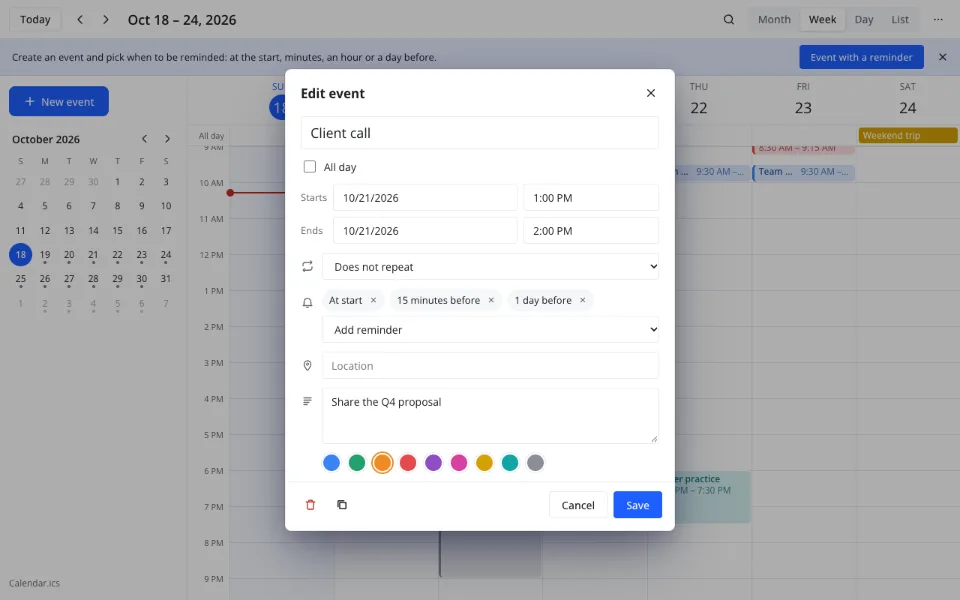
Add another reminder
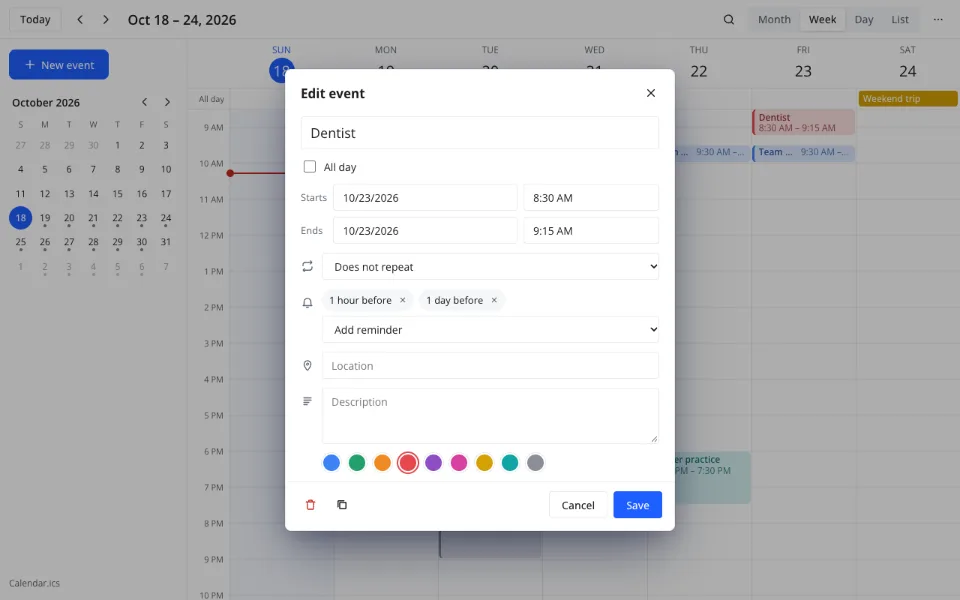
Use the bell icon and Add reminder: At start, 5, 10, 15 or 30 minutes before, 1 hour before or 1 day before. Up to five fit on one event.
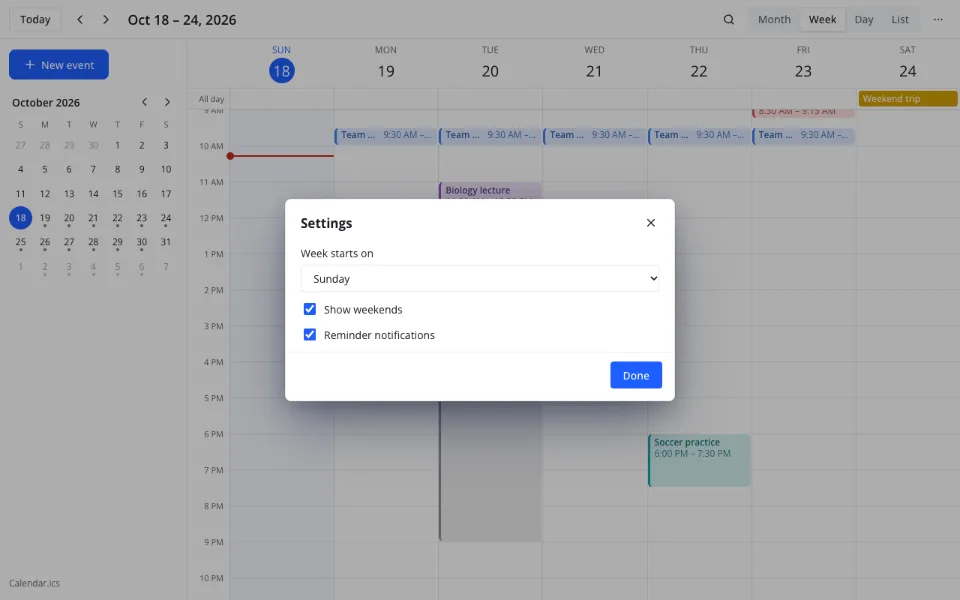
Keep notifications on
Reminders fire while the calendar window is open. The Reminder notifications switch in Settings turns them off or back on.
Which reminder time should I choose?
- At start — for a call or a class you join on the hour
- 5 or 10 minutes before — for a meeting link, a password or a parking spot
- 15 or 30 minutes before — for a short drive or a preparation task
- 1 hour before — for a shift, an appointment across town or a handover
- 1 day before — for a bill, a renewal or a flight with an early check-in
Features
| Feature | What it gives you |
|---|---|
| Reminders per event | Up to five |
| Choices | At start, 5, 10, 15 or 30 minutes before, 1 hour before, 1 day before |
| Default | New timed events get 10 minutes before |
| All-day events | No reminders |
| Delivery | An operating system notification; each reminder fires once |
| Switch | Reminder notifications in Settings |
| Search | Title, location and description, a year back and forward |
What reminders do not do
- They fire only while the calendar window or tab is open
- No SMS and no email reminders
- No reminders on all-day events
- No chat, bot or webhook delivery
- No sharing a reminder with another person
- No sync with a separate reminders service
Privacy
The calendar, including its reminders, is stored as an .ics file in your cloud, with no third-party calendar servers. Stored data is handled under GDPR. On these search pages the calendar runs in your browser, in the page itself.
FAQ
Support: [email protected]
How to add reminders to calendar?
Open an event, click the bell icon and choose Add reminder. Pick At start, 5, 10, 15 or 30 minutes before, 1 hour before or 1 day before. Repeat for up to five reminders on that event. New timed events already have 10 minutes before, so you only change it when you need a different timing.
How to connect calendar with reminders?
There is nothing to connect: reminders are part of the event, set in the same form. That means no second app to install and no account to link. Open the event, use the bell icon, and the reminder is stored with the event in the .ics file, so it travels with the calendar when the file is opened elsewhere.
How to set a reminder on your calendar?
Create or open an event, find the bell icon and choose Add reminder, then select a time. The list covers the start, 5, 10, 15 and 30 minutes before, an hour before and a day before. Up to five reminders can sit on one event, which is useful when a meeting needs both a day-before note and a ten-minute nudge.
Can you sync calendar with reminders?
Not with a separate reminders service — there is no sync of that kind. Reminders live inside each event in the .ics file, so opening or importing the file keeps them attached. What is not available is a link to another reminders app, an email reminder or an SMS reminder sent by a third party.
How to sync calendar with reminders?
Use the calendar's own reminders rather than syncing between apps. They are written with the event into the .ics file, so Save as… or import carries them along. If you need the same nudges on another device, open the calendar there through Zotu; there is no background sync with other calendar or reminders products.
How to link calendar with reminders?
Linking is automatic because the reminder belongs to the event. Click the event, use the bell icon and choose a time; the reminder is saved with the event. To remove one, click the reminder in the list and delete it. The Reminder notifications switch in Settings controls whether the notifications appear at all.
How do I put a reminder on my phone calendar?
Open this page in the phone's browser and add the event with its reminder as usual. Notifications appear while the calendar tab is open; closing the tab stops them. There is no phone app to install, and the same calendar opens on a computer when you sign in to Zotu.
Do reminders work when the calendar is closed?
No. Reminders fire while the calendar window or tab is open, which is the current behaviour of this first version. Closed-window reminders need a scheduler from the operating system, which is not available yet. Keep the tab open on the day you need the nudges, and switch notifications on in Settings.
Is it free? Is there a watermark?
The calendar and its reminders are free and cost $0. There is no paid reminders tier, no watermark and no limit on how many events can have reminders. The only restriction is practical rather than commercial: notifications arrive while the calendar window is open, and all-day events cannot carry a reminder.
Is it safe to use reminders here?
Event details, including titles and descriptions, stay in your own calendar file. On these search pages the calendar runs in your browser; in Zotu it is stored as an .ics file in your cloud, with no third-party calendar servers, under GDPR. Reminder content is not sent to an advertising or messaging service.
More tools
A calendar app that sends reminders before the day runs away
Up to five nudges per event, set in the event form.
Open the calendar